Sony FX3: Everything You Need to Know
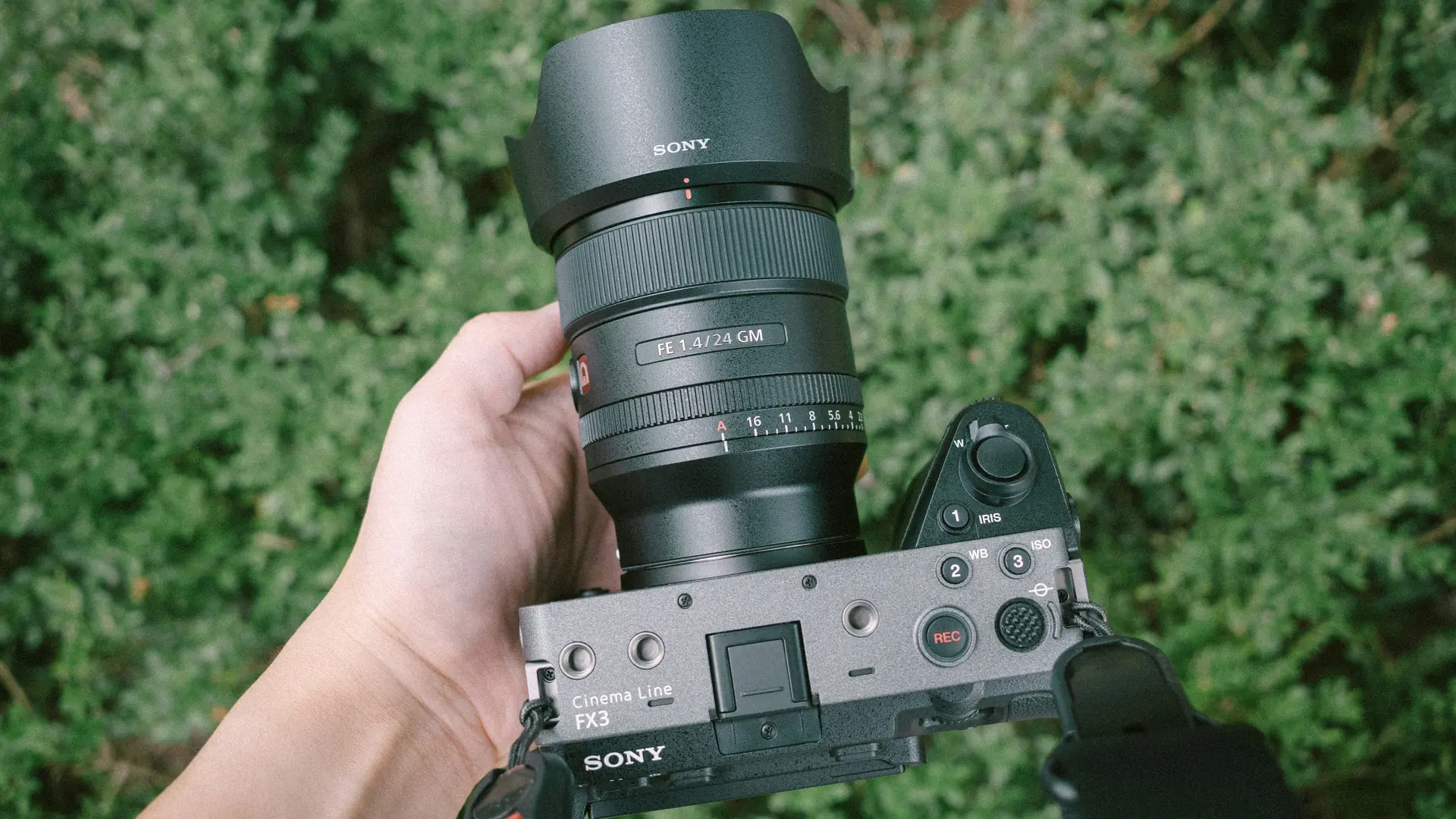
- The FX3 is a full-frame Cinema Line camera with 4K 120p, S-Cinetone colour, and a 12.1MP back-illuminated sensor in a 640g body
- It is Netflix approved, meaning it meets the platform's capture and quality standards for original productions
- The camera has been discontinued and replaced by the new FX3A
- You can hire a Sony FX3 from Sugarland in London
- It pairs well with Sony E-mount lenses, adapted PL or EF glass, and benefits from external monitors and V-mount batteries
The Sony FX3 is a compact full-frame cinema camera launched in February 2021 as part of Sony's Cinema Line, designed specifically for solo creators and small crews who need professional video capability in a lightweight body weighing just 640g.
It combines a 12.1MP back-illuminated sensor, 4K 120p recording, and S-Cinetone colour science in a form factor that bridges the gap between mirrorless hybrids and dedicated cinema cameras.
What is the Sony FX3?
The Sony FX3 is a full-frame interchangeable-lens camera that sits in Sony's Cinema Line, the same family as the VENICE, FX9, and FX6.
Announced on 23 February 2021 and available from March 2021, it was built for handheld shooting, gimbal work, and run-and-gun documentary production where a traditional cinema body would slow you down.
It uses the same 12.1MP back-illuminated full-frame sensor as the Sony A7S III but packages it in a body purpose-built for video.
The active cooling fan means no overheating in long takes, the top handle includes dual XLR inputs, and the tally lamps on three sides of the body make it clear when the camera is rolling on multi-camera shoots.
Sony positioned the FX3 as a tool for creators who want cinema-quality output without the weight, size, or crew requirements of something like an FX9 or VENICE.
What are the key features of the Sony FX3?
The headline features revolve around getting a cinema-grade image out of a body you can carry all day.
The full-frame 12.1MP back-illuminated Exmor R sensor delivers 15+ stops of dynamic range, and the BIONZ XR processor enables 4K recording at up to 120 frames per second with full sensor readout and no pixel binning.
Colour science is a defining feature.
The FX3 includes S-Cinetone, the same look derived from the VENICE colourimetry, which gives natural skin tones and a pleasing out-of-camera image that often needs minimal grading.
For shoots that will go through a full post-production pipeline, S-Log3 and S-Gamut3.Cine are available at both 800 and 12,800 base ISOs, giving genuine low-light flexibility that documentary shooters rely on.
Other practical features that matter day-to-day: 5-axis in-body stabilisation with an active mode for handheld walking shots, dual card slots compatible with both CFexpress Type A and SD cards, a detachable XLR handle unit with two full-size inputs and independent level controls, and sealed buttons with dust and moisture resistance.
The camera body itself, without the handle, weighs only 640g.
The FX3 is also one of our most popular hire items.
At £100/day from Sugarland, it is the most affordable entry point in the Cinema Line, and the Sony FX3 hire page has the full rental details including accessory compatibility.
Does Netflix approve the Sony FX3?
Yes, the FX3 is on the Netflix approved cameras list.
For any producer or director planning a project destined for the platform, this is often a gate-check item before the camera choice is even discussed.
Netflix approval means the camera body meets minimum technical requirements: a true 4K sensor with at least 3840 x 2160 capture resolution, sufficient dynamic range, and the ability to record in a codec and bit depth that holds up through the platform's post-production and delivery pipeline.
For the FX3 specifically, this requires recording in 10-bit 4:2:2 XAVC S-I or XAVC S (All-Intra) at the project's specified frame rate.
It is worth noting that approved camera status applies to the body itself.
The full workflow, from lens choice through colour pipeline to final delivery, still needs to meet Netflix's published technical specifications.
The camera passing the bar removes one major hurdle from the conversation.
Is the Sony FX3 still worth it in 2026?
For most productions, yes.
The FX3 remains a strong choice in 2026 because its core strengths: full-frame sensor, exceptional low-light performance, established colour pipeline, and compact form factor, have not been made obsolete by any single newer release.
The FX30 arrived as a Super 35mm alternative at a lower price, and the FX6 continues to serve crews who need built-in ND filters, SDI outputs, and a shoulder-rig form factor.
If an FX3 Mark II appears with features like internal ND or a higher-resolution EVF, that may change the calculus, but today the current model still handles the majority of professional video jobs without compromise.
Renting changes the value equation further.
Instead of committing £3,900+ to purchase a body, hiring lets you put the right camera against the specific project.
The full-frame camera hire range covers the FX3 alongside the FX6, FX9, and ARRI Alexa Mini LF, so the decision becomes which tool fits the shoot rather than which one you own outright.
For the full breakdown of who it suits and when to size up, see our guide on whether the FX3 is still worth it in 2026.
Has the Sony FX3 been discontinued?
Yes, it has.
Sony released an updated FX3A in May 2025, and the original FX3 has since been phased out as retailers work through remaining stock.
Some dealers still list both at the same price while old stock lasts, but new orders are increasingly being fulfilled with the FX3A instead.
The FX3A brings a few small refinements (an improved rear screen, IR connectivity removed) but keeps the same core sensor, form factor and Cinema Line positioning.
For hire purposes, the difference between the two is minor, and either version covers the same job.
If you're researching the FX3 for a shoot, expect that a hire from most rental companies will include the original FX3 body, not the new FX3A.
How does the Sony FX3 compare to the Sony FX6?
The FX3 and FX6 share the same sensor and similar image quality, but they are built for different shooting styles.
Choosing between them comes down to how and what you shoot rather than which one produces a "better" image.
The FX6 has a traditional box-style cinema body with a shoulder rig form factor, built-in electronic variable ND filters, SDI outputs, and timecode in/out.
It is designed for larger crews, broadcast environments, and shoots where a camera assistant needs direct access to controls on the body.
The FX3 is compact, stripped-back, and built for solo operation or small crews.
It lacks built-in ND and SDI but gains a smaller footprint that works on gimbals, in tight spaces, and for travel shoots where a full cinema rig would be impractical.
The FX3's fully articulated LCD screen and active stabilisation mode favour one-person workflows, while the FX6's detachable LCD and dedicated audio controls suit a sound recordist or second operator.
On cost: the FX6 is £140/day from Sugarland, compared to £100/day for the FX3.
The FX3 vs FX6 vs FX9 comparison post goes deeper into frame rates, codec options, and which productions tend to favour which body.
Key differences in practice:
- Built-in variable ND: FX6 has it, FX3 requires screw-on or matte-box ND filters
- SDI output: FX6 has it for professional monitoring and broadcast integration, FX3 is HDMI only
- Timecode: FX6 has dedicated timecode in/out, FX3 requires audio-track timecode via a Tentacle Sync or similar device
- Weight and handling: FX3 at 640 g (body only) suits gimbal and handheld work, FX6 at 890 g (body only) is ideally shoulder-mounted
- Audio: both offer dual XLR inputs, but the FX6 has four channels of audio recording versus the FX3's two
How to set up the Sony FX3 for video
Getting the FX3 ready for a shoot means dialling in a few key settings before you roll.
The camera ships with flexible defaults, but the choices you make around picture profile, exposure tools, autofocus, and recording format have a direct impact on what you can do in post.
Start with picture profile.
For projects with a fast turnaround or minimal grade, set the camera to S-Cinetone in the Picture Profile menu.
This gives a ready-to-edit look with natural skin tones and a contrast curve that usually needs only minor adjustments.
For projects heading into a full colour grade, switch to S-Log3 with S-Gamut3.Cine.
When shooting S-Log3, stay at the base ISOs: 800 for standard dynamic range and 12,800 for low light, as these are the two settings where the sensor's full dynamic range is available.
Next, set up exposure tools. Zebras are the most practical on-set guide.
For S-Cinetone, set zebra 1 to 70% for skin tones and zebra 2 to 94% for highlight clipping.
For S-Log3, use the waveform monitor and aim to place a grey card at roughly 41 IRE, with skin tones falling around 55 to 60 IRE depending on complexion.
Set the camera to display the waveform on the LCD and use an external monitor for a larger, more accurate read when possible.
Autofocus configuration is where a lot of the camera's real-world usability lives.
In the AF/MF menu, set Focus Area to either Flexible Spot (for controlled shots) or Tracking (for moving subjects).
Adjust AF Transition Speed to 3 to 5 for a natural focus pull that does not feel robotic.
AF Subject Shift Sensitivity at 3 is a good default for most documentary work; push it higher for unpredictable action and lower for interview-style setups where you do not want the focus jumping to a background object.
Assign custom buttons to the controls you reach for most.
A common setup: custom button 1 to toggle zebras on and off, custom button 2 to cycle focus area, custom button 3 to toggle the waveform display, and the centre button of the control wheel set to punch in for focus magnification.
The FX3's custom key menu in the Setup section lets you map these to whatever physical buttons feel most natural.
Finally, choose your recording format based on the project's delivery requirements.
For 10-bit 4:2:2 with manageable file sizes, XAVC S 4K at 200 Mbps covers most general production work.
For VFX plates or heavy grading, XAVC S-I 4K at 500 Mbps records in All-Intra, which is easier on editing systems and holds up better through multiple render passes.
Set the card slot configuration to Simultaneous Recording if you need an instant backup, or Relay Recording to span long takes across both cards.
A small but important note on accessories: The FX3's included NP-FZ100 battery is good for about 90 minutes of continuous 4K recording, but a V-mount battery kit feeding the camera via a d-tap battery adapter is the more practical solution for a full shoot day.
Lenses and accessories that work best with the FX3
The FX3's E-mount gives you access to a huge lens ecosystem, and the choices you make around glass and rigging have a bigger impact on the final image than almost anything else you can bolt onto the body.
Native Sony E-mount lenses are the most straightforward path.
The Sony 24-70mm f/2.8 G Master II is the workhorse zoom that covers most interview, documentary, and corporate work.
For a full set of primes, the Sony 35mm, 50mm, and 85mm f/1.4 G Masters give consistent colour rendering and fast manual override when you need to pull focus yourself.
The 16-35mm f/2.8 G Master covers wide interiors and establishing shots, while the 70-200mm f/2.8 G Master II handles compressed telephoto work and observational filming.
If your project calls for PL-mount cinema glass, a EF to E-mount adapter opens up a wide range of lenses.
The Zeiss CP3 compact primes and Sigma FF High Speed primes are both available in PL mount and adapt cleanly to E-mount with the Metabones adapter, giving you cinema-grade mechanics and consistent T-stops without needing to switch camera bodies.
On the accessory side, start with the items that improve monitoring and power.
An external on-camera monitor like the SmallHD Ultra 5 gives you a brighter, sharper reference than the FX3's built-in LCD, plus waveform and false colour tools that are easier to read under daylight.
A V-mount kit with a dummy battery adapter plate keeps the FX3 running for hours rather than the 90 or so minutes the internal NP-FZ100 manages.
A cage rounds out the essentials. The SmallRig cage for the FX3 adds mounting points for the monitor, a wireless video transmitter like the Teradek Bolt, and a top handle if you are shooting without the XLR unit.
It also protects the HDMI port with a cable clamp, which matters because the FX3's full-size HDMI port is one of the few structural weak points on an otherwise durable body.
Frequently asked questions
Can I use Canon EF lenses on the Sony FX3?
Yes. A Metabones EF to E-mount adapter allows you to mount Canon EF glass on the FX3 with full electronic communication, meaning autofocus, aperture control, and image stabilisation all work.
The adapter opens up access to a wide range of EF-mount lenses including the Canon 24-70mm f/2.8, 70-200mm f/2.8, and specialist options like the 8-15mm fisheye zoom or the 100mm f/2.8 macro.
What memory cards does the Sony FX3 need?
The FX3 uses dual card slots, each compatible with either CFexpress Type A or SD (UHS-II) cards.
For 4K 120p recording or the highest-bitrate XAVC S-I codec, you will need CFexpress Type A cards, which handle the sustained write speeds that fast All-Intra recording demands.
Standard XAVC S 4K at 200 Mbps runs fine on fast SD cards. Sony's CFexpress Type A TOUGH cards are the official recommendation, though third-party SD cards with V90 speed ratings work reliably for most recording formats below the maximum bitrate options.
Is the Sony FX3 good for stills photography?
It can take stills, but that is not what it is built for.
The FX3 shares the same 12.1 MP sensor as the A7S III, which prioritises large individual pixels for video sensitivity over high-resolution stills.
You can capture 12-megapixel stills in RAW or JPEG while recording video, and the electronic shutter works silently, but it lacks a mechanical shutter, a dedicated stills mode dial, and the higher-resolution EVF found on Sony's photography-focused bodies.
If your work is 90% video and 10% stills, the FX3 handles the stills side adequately. If the ratio is reversed, a camera like the A7 IV or A7R V makes more sense.
How long does the FX3 battery last?
The NP-FZ100 battery provides roughly 90 to 105 minutes of continuous 4K recording, depending on whether you are using the LCD or an external monitor, how much autofocus activity there is, and whether the XLR handle is drawing power.
In real-world shooting with start-stop recording and idle periods, a single battery typically covers 2 to 3 hours.
For a full shoot day, V-mount batteries are the practical solution. They connect to the FX3 via a d-tap battery adapter, running the camera for 6 hours plus on a single battery.
Can I rent the Sony FX3 from Sugarland?
Yes, the Sony FX3 is available for hire at £100/day +VAT from our North London base in Crouch End, with delivery and collection across London.
You can request a quote through the form on the site.
Let’s plan your next shoot
Get your equipment, studio and crew all in one place.