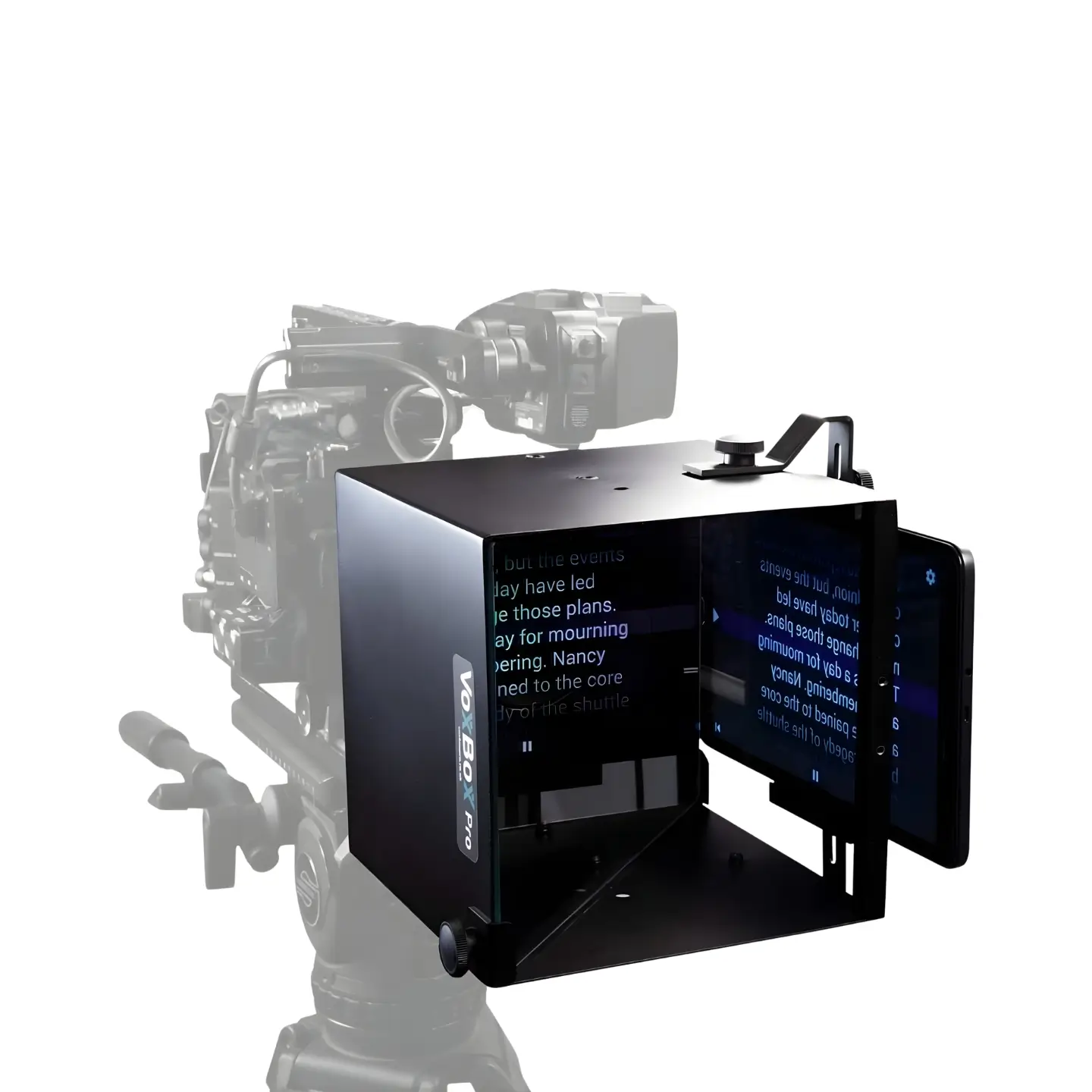
VoxBox Pro MKII Mirror Box
The VoxBox Pro MKII is a professional mirror box system that positions in front of the camera lens, using beamsplitter glass technology to allow subjects to see interviewers or read scripts while maintaining direct eye contact with the camera lens.
Kit includes
1 x VoxBox Pro MKII
1 x Beamsplitter Glass
1 x Side Mirror
1 x Spigot
3 x Doughnuts
1 x Tablet Holder
1 x Allen Key
1 x Colour Chart
1 x Glass Cleaning Cloth
1 x Instruction Manual
1 x Hard Case
1 x Stand
1 x Sand Bag
1 x Apple iPad 10.9" 10th Generation (optional extra)
Key features
- Beamsplitter glass positioned at 45 degrees reflects content from the side while remaining transparent to the camera
- Creates genuine down-the-lens eye contact as subjects look at reflections while actually looking straight into the lens
- Interview mode with tilting side mirror reflects the interviewer sitting beside the camera for natural conversation
- Teleprompter mode using included tablet holder attaches to the side and reflects script text for direct-to-camera delivery
- Quick attachment to existing 15mm camera rails or standard lighting stands via included 16mm receiver for DSLR setups
- Lightweight aluminium construction can be stored fully rigged in the included hard case for setup in under two minutes
- Voice detection autocue software with optional iPad automatically scrolls scripts at the speaker's natural pace
- Complete kit with doughnuts, colour chart, and cleaning cloth ensuring optimal image quality with less than one stop light loss
Description
The VoxBox Pro MKII solves one of the most challenging aspects of professional filming - creating genuine eye contact between the subject and the camera lens. The beamsplitter glass technology positions at 45 degrees in front of the lens, reflecting content from the side while remaining transparent to the camera. In interview mode, the tilting side mirror reflects the interviewer who sits beside the camera. The subject sees the interviewer and naturally converses with them, but they're actually looking straight down the camera lens. This creates powerful, engaging footage where the subject appears to be speaking directly to the audience with natural eye contact.
We've supplied this system extensively for corporate videos, testimonials, and interview-based content where direct audience connection is crucial. The psychological difference is remarkable - subjects relax when they can see and respond to a real person rather than talking to a blank lens, resulting in more natural, confident performances. For teleprompter mode, simply swap the side mirror for the included tablet holder. The tablet attaches to the side of the unit displaying script text, and the beamsplitter glass reflects this to the subject. They read the script while maintaining perfect eye contact with the lens - ideal for corporate communications and scripted direct-to-camera pieces.
The optional iPad with voice detection autocue software makes script delivery remarkably smooth. The software automatically scrolls at the talent's speaking pace, creating natural delivery without manual control or the need for an operator. The complete kit attaches to standard 15mm rails or mounts on lighting stands, and can be stored fully assembled in the hard case for rapid deployment on location. Whether shooting corporate interviews, testimonials, training videos, YouTube content, or any production requiring authentic down-the-lens eye contact, the VoxBox Pro MKII delivers professional results that genuinely connect with audiences.
FAQs
How does the VoxBox create down-the-lens eye contact? The beamsplitter glass sits at 45 degrees in front of your lens and reflects content from the side - either the interviewer via the side mirror, or script text from a tablet. The subject sees this reflection and looks at it naturally, but they're actually looking straight into the camera lens. The beamsplitter glass is transparent to the camera, so it captures the subject looking directly down the lens while they see the reflected content. This creates genuine eye contact between subject and audience.
How do I switch between interview and teleprompter modes? Simply swap the side mirror for the tablet holder. Both attach to the side of the VoxBox unit. In interview mode, the side mirror reflects the interviewer sitting beside the camera. In teleprompter mode, the tablet holder displays your script and the beamsplitter glass reflects this text to the subject. Both create the same result - the subject sees reflected content while looking into the lens.
Where does the interviewer sit? The interviewer sits beside the camera, and the tilting side mirror reflects their image into the main beamsplitter glass. The adjustable side mirror allows flexible positioning at various angles, so you can adapt to different room layouts and shooting spaces without compromising the effect.
Do I need the iPad or can I use my own tablet? You can use your own tablet if it fits the holder (maximum 188mm between clamps), though we recommend our optional iPad as it comes with voice detection autocue software optimized for professional use. The voice detection automatically scrolls the script at the talent's speaking pace for natural delivery. If you use your own device, you'll need your own teleprompter app.
Is setup complicated? No, setup takes under two minutes, especially if stored fully rigged in the case. The unit slides directly onto existing 15mm camera rails or mounts to a lighting stand via the included 16mm receiver. Attach either the side mirror for interviews or the tablet holder for teleprompter mode, and you're ready to shoot. The hard case allows you to store everything fully assembled for even faster deployment on location.
Does the beamsplitter glass affect image quality? The beamsplitter glass causes less than one stop of light loss, which is easily compensated by opening your aperture slightly or adjusting lighting. The glass is completely transparent to the camera when properly positioned, with no visible reflections or distortion in your footage. We include a glass cleaning cloth to maintain optimal clarity.
What productions is the VoxBox best for? We've supplied it extensively for corporate communications, testimonials, training videos, YouTube content, documentary interviews, and any production where authentic down-the-lens eye contact matters. It's particularly valuable for corporate clients who want subjects to appear confident and connected with the audience, and for any content where the psychological comfort of seeing an interviewer or reading a script helps subjects deliver better performances.
How far in advance should I book? The VoxBox Pro MKII is popular for corporate and interview-based productions, so we recommend booking as early as possible. Request a quote with your dates and let us know if you need the optional iPad with autocue software.
Please note: all prices are excluding VAT
Related equipment
Similar equipment options for you to consider.
-min%20(1).jpg)
-min.jpg)
.jpg)
How to hire with us
Our simple 3-step process makes it easy to hire with us.
Step 1: Request a quote
Tell us what you need and when you need it. We'll get back to you with a tailored quote for your specific project needs and timeline.
Step 2: Create an account
Create an account with us via our Account Application form. This is a one-time setup and once completed you won’t need to sign up again.
Step 3: Confirm your hire
Once your account is verified and the invoice has been settled, your hire is confirmed. You can now use kit/studio & crew services for your chosen dates.
Ready to build your kit?
We'll help you configure the perfect setup for your needs.