How Does the Hollyland Solidcom C1 Pro Work? Setup, Key Features and What It's Used For

- The Solidcom C1 Pro is a full-duplex wireless intercom system: everyone talks and listens at once, no push-to-talk delay like a walkie
- It's one of our most-hired comms kits right now, popular for its clear audio, long range and easy setup
- You can link up to 3 hubs together for larger crews, with A/B channel grouping and a dedicated director's line
- Pairing a headset takes seconds; linking multiple hubs takes a couple of minutes once you know the steps
- Frequency response runs 150Hz to 7kHz, wide enough for natural, clear speech even in noisy environments
Anyone who's run a shoot on walkies knows the problem.
Someone presses to talk, someone else is already mid-sentence, and half the crew misses the call for camera because the channel was busy.
It works, until it doesn't, and it doesn't at the worst possible moment.
That's the gap the Solidcom C1 Pro fills. It's become one of our most popular hire items lately, and once you've used one on a shoot, it's easy to see why.
Here's how the Hollyland Solidcom C1 Pro works, what it's used for, and how to set one up on set.
What Is the Hollyland Solidcom C1 Pro Used For?
The Solidcom C1 Pro is used for hands-free, real-time team communication on film, TV and live event productions. Directors, camera operators, sound recordists, gaffers and grips wear a headset each and talk to the whole team without pressing a button.
That's the key difference from a walkie-talkie: it's full-duplex, not half-duplex.
Everyone can speak and listen at the same time, like a phone call, rather than taking turns on a single channel.
For anything needing tight coordination (a multi-camera fashion show, a live broadcast, a complex lighting setup) that difference matters more than it sounds like it should.
Productions reach for this kind of system when the job has multiple departments that need to stay in constant contact, not just the odd update here and there. If you're running crew across camera, sound and lighting on the same shoot, a shared comms line tends to pay for itself in saved time alone.
How Does the Hollyland Solidcom C1 Pro Compare to a Walkie-Talkie?
The main difference is that everyone can talk and listen at once, instead of taking turns on a single channel.
On a walkie, one person presses to talk and everyone else has to wait. On the C1 Pro, the director can be mid-sentence to camera while sound quietly flags a boom shadow, and neither call gets lost.
One feature that genuinely sets it apart is the director's ANNOUNCE function.
Press it, and it mutes every other headset in the system so the director's instruction comes through clearly, no talking over each other, no missed cue.
It's a small thing on paper, but on a busy set with a big crew, it's the difference between a clean take and a reshoot.

Key Features of the C1 Pro Headsets
The C1 Pro kit has become one of our go-to hires for a reason. Clients often describe it as "solid", which, name aside, is a fair way to put it. It just works, time after time.

Here's what each headset gives you:
- Noise cancellation. Dual-mic ENC technology strips out background noise so the person talking comes through clearly, even on a loud set
- Flip-to-mute. Rotate the mic boom up and you're muted, no fumbling for a button mid-shot
- Volume and mute controls. Simple dial and button controls built into the headset itself
- Clear, wide-range audio. Reviewers rate the audio quality and comfort highly, and it holds up over a full shift
- Long range. A reliable line-of-sight range that comfortably covers most studio and location setups
None of this is complicated to use. Switch a headset on, put it on, and you're talking to the team within seconds.
What DECT 6.0 Is and Why It Matters
Most film and TV sets are noisy places for wireless signal, not just noisy for sound.
Wireless monitors, radio mics, phones and Wi-Fi routers are all fighting for the same airwaves, and that's before you add a comms system into the mix.
This is where the C1 Pro's choice of technology quietly does a lot of work.
The C1 Pro runs on DECT technology, which operates on its own dedicated frequency band rather than sharing space with Wi-Fi and Bluetooth.
Compared to more common 2.4GHz wireless systems, DECT holds up better against interference in busy environments, which is exactly the kind of environment a film set tends to be.
On a set full of wireless monitors, radio mics and phones, that stability is worth more than it might sound.
How Do I Connect a Hollyland Headset?
Connecting a single headset to the hub is simple:
- Turn on the hub and the headset
- Connect them with the supplied USB cable
- Select a number for that headset on the hub's display to confirm the pairing
- Repeat for each additional headset
Once paired, the headset stays linked to that hub, so this is a one-off job per headset rather than something you need to redo every shoot day.
If you're pairing for the first time or troubleshooting a headset that's dropped its connection, Hollyland's own pairing guide walks through the exact steps and screen prompts.
How Does Linking Multiple Hollyland Solidcom C1 Pro Hubs Work?
You link multiple hubs by setting one as master and the others as remote, then connecting them over ethernet:
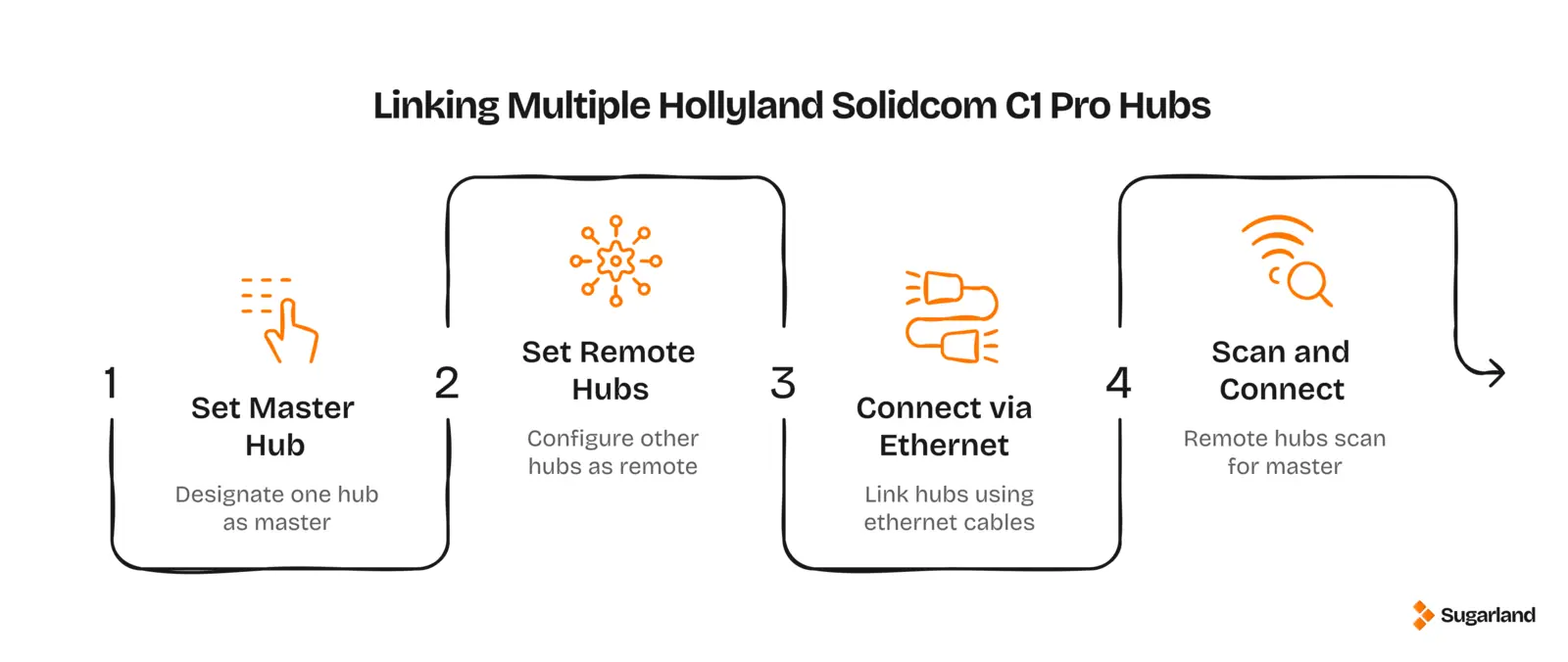
- Hold the middle button on each hub to go to the menu
- In the menu, go to M&R
- Set the first hub to master mode
- Set the second (and third) hub to remote mode
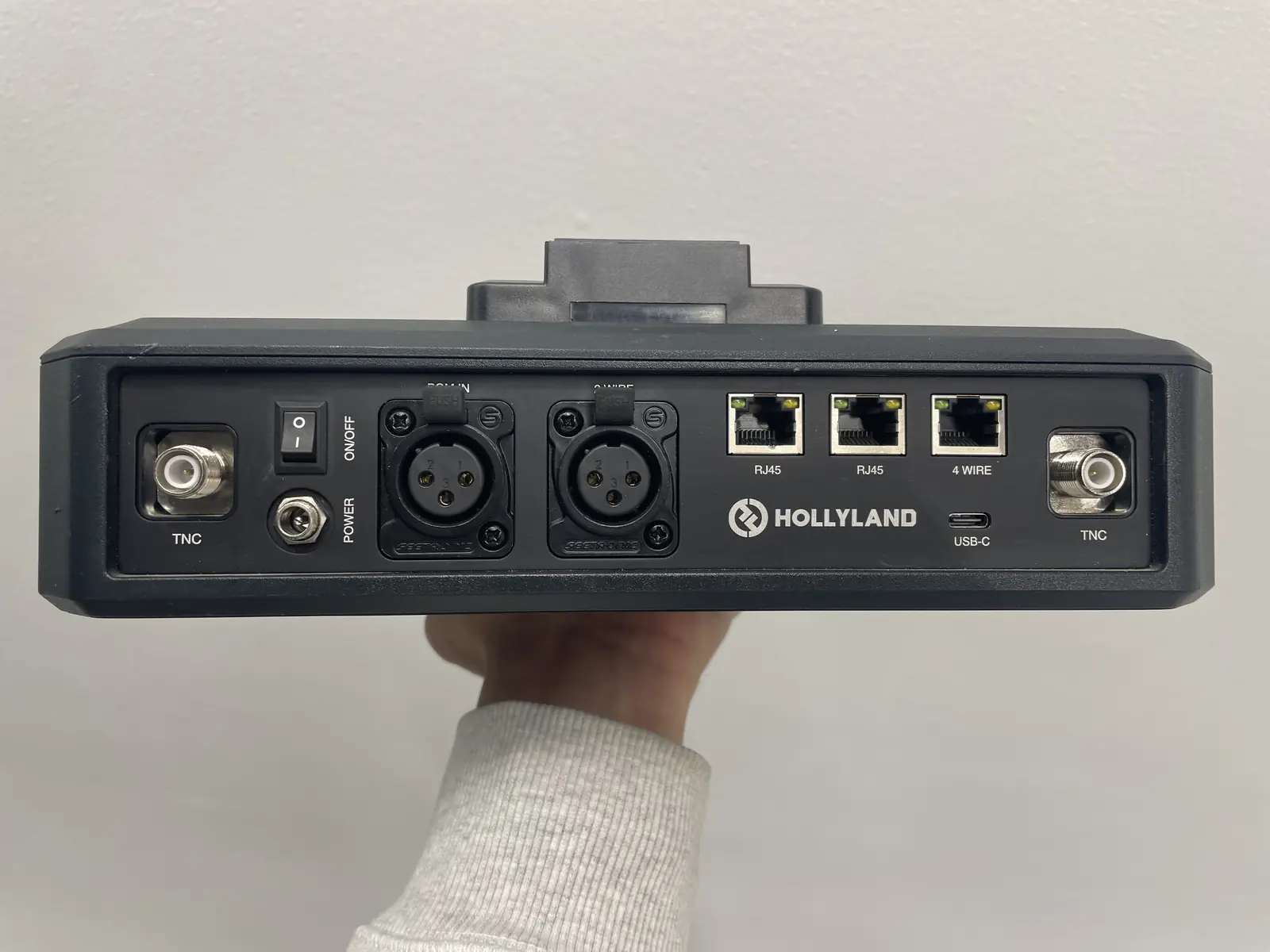
- Plug an ethernet cable into the RJ45 ports on the back of the master hub and plug into each remote hub
- Scan for the master hub from each remote hub and connect
Once linked, all the headsets across every hub can talk to each other as one system.
This is where the C1 Pro earns its keep on bigger jobs.
Linking hubs together lets you run far more headsets than a single hub allows, split the team into A and B channels so, say, camera and lighting aren't cluttering the same line as production, and still keep a dedicated director's headset with priority announce access.
You can cascade three hubs together this way, which covers the vast majority of productions we supply for.
One thing worth flagging before you link hubs and headsets: make sure everything is running the same firmware version first.
Mismatched firmware between hubs and headsets is the most common cause of pairing or connection issues.
Updating is straightforward:
- Download the latest firmware onto a USB stick under 32GB (formatted FAT32)
- Plug the USB stick into the hub to update it first
- Connect each headset in turn to bring it up to the latest headset firmware version
Hollyland's own firmware download page has the current hub and headset files, plus a full upgrade tutorial, if you want to do this yourself before a shoot.
There's no need to update the kits if you're hiring them from us, as we always check each set and make sure they're synced together if you need multiple kits, before it goes out the door.
What Is the Frequency Response of the Solidcom C1 Pro?
The Solidcom C1 Pro has a frequency response of 150Hz to 7kHz. That range comfortably covers the natural pitch of human speech, which is why voices come through clearly and naturally rather than sounding thin or muffled, even with noise cancellation running. It's a spec built for intelligible speech over long shifts, not for music or broadband audio, which is exactly what an on-set comms system needs to get right.
Is It Worth Hiring Over a Walkie System?
For any shoot with more than a couple of departments talking to each other constantly, yes. Once you've had a full-duplex system running smoothly through a multi-camera setup, a busy live event or a fashion show, it's hard to justify going back to push-to-talk radios and the delays that come with them.
If you're weighing it up for an upcoming production, request a quote and we'll talk you through what setup makes sense for your crew size and shoot type.
Let’s plan your next shoot
Get your equipment, studio and crew all in one place.